 Brand
Brand

UTM parameters are mainly used for tracking marketing campaigns. They are not a replacement for SEO methods, like keyword research, quality content, technical improvements or creating links. When you run marketing campaigns an important question is simple: Where're your website visitors coming from?
You might get visitors from Instagram, Facebook Google Ads, email campaigns, WhatsApp, YouTube or other sites. Your website analytics can show that people are visiting your site.. Sometimes you need more detail to see which exact campaign or link brought them there.
This is where UTM parameters become useful. UTM parameters are pieces of information that get added to the end of a website URL. They help marketers figure out where the visitors to the website are coming from and see how different marketing campaigns are doing. You don't have to be a specialist to use them. Once you learn what the parameters mean you can begin tracking your campaigns precisely.
What Are UTM Parameters?
UTM stands for Urchin Tracking Module. UTM parameters are tags that are added to a URL to share details, about where the website traffic comes from. I find that UTM parameters help me understand the source of my visitors.
For example a regular website URL might look like this: https://example.com/services A tracked URL could look like this: https://example.com/servicesutm_source=instagram&utm_medium=social&utm_campaign=summer_offer
The page is still the same. The additional information tells your analytics system where the visitor came from.
This can help you answer questions such as:
Did people click the link, in the email? Which advertisement brought visitors to the website?
Which social media post led to website visits? UTM tracking is especially useful when you are running marketing campaigns at the time.
Why Are UTM Parameters Important?
Website traffic numbers alone do not always tell the story. Imagine your website gets 5,000 visitors in one month. That seems like a number. You may want to know where those visitors came from. Maybe 2,000 came from Google. 1,500 Came from Instagram. 800 Came from Facebook. The rest came from sources. Now imagine you are running three Instagram campaigns. You may want to know which campaign actually brought people to your website.
UTM parameters help separate these campaigns. They allow marketers to connect website visits with marketing activities. This makes campaign analysis easier. Helps businesses understand where their marketing efforts are generating traffic.
The Five Main UTM Parameters
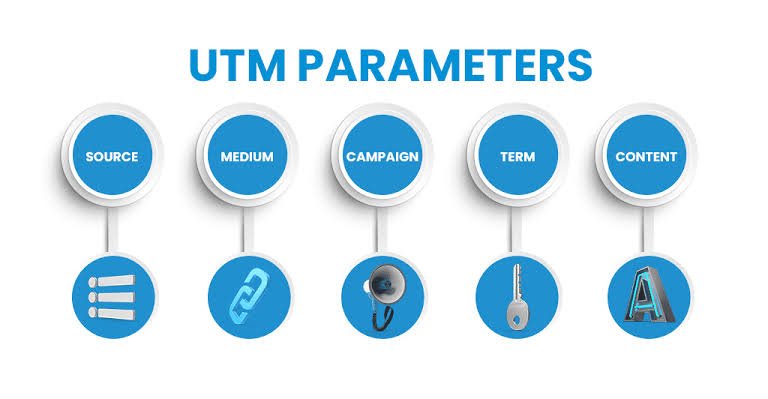
There are five used UTM parameters:
1. UTM Source
2. UTM Medium
3. UTM Campaign
4. UTM Term
5. UTM Content

You do not always need to use all five. The commonly used parameters are source, medium and campaign. Lets understand each one.
1. UTM Source
The utm_source parameter tells you where the traffic came from.
Examples include:
* YouTube
* Newsletter
For example: utm_source=instagram This tells your analytics platform that the visitor came through Instagram. If you are promoting the website link on different platforms using the source parameter helps you identify which platform generated the traffic.
2. UTM Medium
The utm_medium parameter describes the type of marketing channel used.
Examples include:
* cpc
* banner
* referral
For example:
utm_medium=social
This shows that the traffic came from a social media channel. For a paid advertising campaign you could use:
utm_medium=cpc
The way you name things can be different. Keeping it the same is important.
3. UTM Campaign
The utm_campaign parameter shows which marketing campaign it is.
For example:
utm_campaign=summer_sale
If your business runs campaigns throughout the year campaign names make it easier to separate their results.
You could have:
utm_campaign=diwali_offer
or
utm_campaign=website_launch
or
utm_campaign=lead_generation_september Try to use consistent campaign names.
4. UTM Term
The utm_term parameter is commonly used to identify paid search keywords.
For example:
utm_term=digital_marketing_agency
This can help you understand which keyword was associated with a paid search visit. For businesses running search advertising campaigns this parameter can be useful when analysing keyword-level performance. It is not necessary for every campaign.
5. UTM Content
The utm_content parameter helps distinguish links or advertisements within the same campaign. Imagine you are running one Facebook campaign with two advertisements. One advertisement uses a video. Another uses an image.
You could use: utm_content=video_ad and utm_content=image_ad This allows you to compare which version generated website visits. It can also be useful when you have links in the same email or page.
A Simple UTM URL Example
Here is an example: https://example.com/?utm_source=instagram&utm_medium=social&utm_campaign=diwali_offer&utm_content=reel_01
This URL tells you:
* Source: Instagram
* Medium: Social
* Campaign: offer
* Content: Reel 01
If someone clicks this link the information can be passed into your analytics platform. This gives you context about the visitors journey. How UTM Tracking Works The process is actually quite simple. First you create a URL for your website. Next you add UTM parameters to that URL. Then you use the tracked URL in your marketing campaign.
When someone clicks the link and visits your website the analytics platform can record the campaign information. Later you can check your analytics reports to understand the traffic associated with your campaign. The important point is that UTM parameters do not change the webpage. They simply add tracking information to the URL.
Where Can You Use UTM Parameters?
UTM parameters can be used in different marketing activities.
Social Media: You can create UTM links for Instagram, Facebook, LinkedIn and other platforms. For example a link shared in an Instagram bio can have tracking information from a link used in a Facebook post.
Email Marketing : If you send newsletters or promotional emails UTM parameters can help you identify traffic coming from those emails. You can even use content values for different buttons.
Paid Advertising : UTM parameters can help organise traffic from advertising campaigns. You can create campaign- URLs for different advertisements, platforms or creative formats.
YouTube : If you include your website link in a YouTube video description UTM tracking can help identify traffic generated from that link.
QR Codes : UTM-tagged URLs can also be used behind QR codes. For example a restaurant could place a QR code on a printed poster. Use a tracked URL to understand how many website visits came from that poster.
UTM Parameters and Google Analytics
UTM parameters are commonly used with Google Analytics. When someone clicks a tagged link, analytics tools can use the campaign information to help categorise the traffic. You can then analyse campaign-related traffic. Compare different marketing activities.
For example you might discover that one social media campaign brought visitors but another campaign brought fewer visitors who spent more time on your website or completed more enquiries.
- This is why you should not focus on traffic numbers.
- The useful question is often:
- What did those visitors do after reaching the website?
Traffic Is Not the Same as Conversions
A campaign can generate thousands of clicks without generating many customers. Another campaign might generate clicks but produce more enquiries or sales. UTM tracking can help you connect traffic with campaign information while your analytics and conversion tracking can help you understand what happened after visitors arrived.
For example:
Campaign A ? 2,000 visitors ? 20 enquiries
Campaign B ? 700 visitors ? 35 enquiries Looking at traffic would make Campaign A appear larger. Looking at enquiries gives you a picture. This is why campaign tracking should be connected with business goals.
Common UTM Mistakes to Avoid
- One of the mistakes is using inconsistent naming.
- For example one person may use: utm_source=Instagram
- while another uses: utm_source=instagram These may be treated differently in reporting. Another common problem is creating campaign names such, as:
- Without a naming system reports can become confusing.
- Avoid spaces and complicated names. Use consistent naming conventions.
- Another mistake is forgetting to add tracking parameters to campaign links.
- If you track one advertisement but not another comparing their performance becomes more difficult.
Create a UTM Naming System
If several people work on your marketing create a naming system.
For example: Source: instagram, facebook, google, youtube
Medium: cpc, email, referral
Campaign: summer_sale, diwali_offer, product_launch
Content: reel_01, image_01 video_02 This makes your reports easier to understand.
It is also an idea to keep a spreadsheet containing your campaign URLs. Record the campaign name, platform, date, destination page and UTM link. This can prevent duplicate or named links.
Use a URL Builder
You do not need to type every UTM parameter. URL-building tools can help you create campaign URLs by entering the source, medium, campaign and other information.
Before sharing the URL make sure the final link works properly and sends visitors to the page. If you are using the link in ads, emails or posts on media test it before you start the campaign.
Keep URLs Clean and Organised
UTM URLs can be long especially when you add parameters.
That is expected.
Keep the values short and clear. Do not include details that are not needed.
For example: `utm_campaign=diwali_offer` is easier to read than a complicated campaign name. A good naming system makes it easier to read reports
Do UTM Parameters Affect SEO?
UTM parameters are mainly used to track marketing campaigns. In my experience UTM parameters are not a replacement for SEO methods such, as keyword research, good content, technical improvements or link building. When you use campaign URLs it is important to set up analytics and website settings so that tracking tags do not cause any problems with how the site is indexed.
For campaign tracking UTM parameters help to see where the traffic is coming from but they do not help with search rankings.
How Small Businesses Can Use UTM Tracking
UTM tracking is not for big companies.
Small businesses can use it to see which marketing efforts bring people in.
For example a local salon could make links for:
* Instagram bio
* Instagram reels
* Facebook posts
* Google Ads
* WhatsApp campaigns
* Printed QR codes
After the campaigns run the business can see which source brought the traffic. A digital marketing agency can do the same for clients and different campaigns. This helps make marketing choices based on data.
Final Thoughts
UTM parameters are a helpful part of digital marketing. They help businesses see where website visitors are coming from and make it easier to manage campaign data. The main parameters to remember are:
Source: shows where the visitor came from.
Medium: shows the marketing channel.
Campaign: shows the campaign.
Term: can show paid search keywords.
Content: helps tell links or ads apart.
The important thing is to be consistent. Make a naming system and use it for all your campaigns. When UTM tracking is used with conversion tracking and analytics you can move beyond just asking, "How many people came to my website?" . That data can help you understand how your marketing is doing and make choices, about where to spend your time and money.


0 Comments
No comments yet. Be the first to share your thoughts!
Leave a Comment